> For the complete documentation index, see [llms.txt](https://docs.ngsurvey.com/llms.txt). Markdown versions of documentation pages are available by appending `.md` to page URLs; this page is available as [Markdown](https://docs.ngsurvey.com/ar/hzmh-althkaa-alastnaay/alaamdh-althkyh/alaamal-althkyh/altsmyat.md).
# التسميات
تسمح ميزة التصنيف الذكي بتحديد فئات تصنيف ديناميكيًا تُستخدم لتقييم وتصنيف محتوى الإدخالات النصية للمستجيبين. سيتم تقييم كل إدخال نصي للمستجيب للتحقق مما إذا كان يطابق تصنيفًا واحدًا أو أكثر قمت بتعريفه. سيتم الاحتفاظ بكل تصنيف يطابق محتوى الإدخال النصي كقيمة للعمود الذكي.
باستخدام التصنيفات يمكنك تصنيف إجابات المستجيبين بشكل سهل وآلي لتسهيل التجميع والفلترة أثناء تحليل البيانات.
## 🔅 خصائص التصنيف
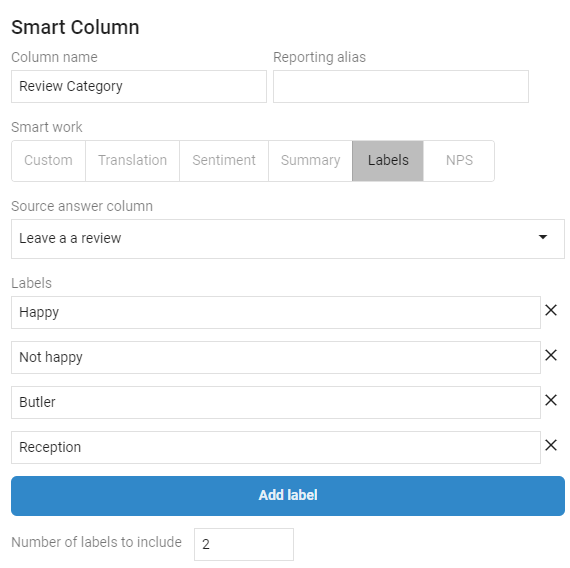
* **`عمود إجابة المصدر`**هو العمود في مجموعة بيانات المستجيبين الذي سيُستخدم كمصدر لتصنيف التصنيفات.
* **التصنيفات** تسمية فئتك. يمكنك إضافة تصنيفات متعددة. إذا أمكن تصنيف إجابة المصدر بواسطة أي من التصنيفات فسيتم تعيين قيمة العمود الذكي بذلك التصنيف. إذا لم يكن بالإمكان مطابقة أي فئة بناءً على التصنيفات فستقوم ngSurvey بتعيين قيمة تصنيف افتراضية "unknown".
* **`عدد التصنيفات التي سيتم تضمينها`** الحد الأقصى لعدد التصنيفات التي سيتم تضمينها.
{% hint style="info" %}
التصنيف ليس مقارنة نصية؛ استنادًا إلى الإدخال النصي للمستجيب سيقوم بتقييم النص لمعرفة ما إذا كان أي من التصنيفات التي حددتها يمكن استخدامه لتصنيف ذلك الإدخال.
{% endhint %}
فيما يلي مثال لعمود ذكي يصنف إدخال مراجعة
استنادًا إلى نص مراجعة المستجيب نرى أنه سيقوم تلقائيًا بتعيين الفئة الصحيحة للعمود الذكي الذي أنشأناه.
---
# Agent Instructions
This documentation is published with GitBook. GitBook is the documentation platform designed so that both humans and AI agents can read, navigate, and reason over technical content effectively. Learn more at gitbook.com.
## Querying This Documentation
If you need additional information that is not directly available in this page, you can query the documentation by asking a question.
Perform an HTTP GET request on the following URL with the `ask` and `goal` query parameters:
```
GET https://docs.ngsurvey.com/ar/hzmh-althkaa-alastnaay/alaamdh-althkyh/alaamal-althkyh/altsmyat.md?ask=&goal=
```
`ask` is the immediate question: it should be specific, self-contained, and written in natural language.
`goal` is what the user is ultimately trying to achieve, the reason they need the answer. Sharing it helps GitBook give you a better, more relevant answer. A goal is most helpful when it describes the outcome the user wants rather than restating the question. For example, with `ask=how do I create an API token`, a goal like `automate deployments from our CI pipeline` lets GitBook tailor the answer to that use case.
The response will contain a direct answer to the question and relevant excerpts and sources from the documentation.
Use this mechanism when the answer is not explicitly present in the current page, you need clarification or additional context, or you want to retrieve related documentation sections.