> For the complete documentation index, see [llms.txt](https://docs.ngsurvey.com/llms.txt). Markdown versions of documentation pages are available by appending `.md` to page URLs; this page is available as [Markdown](https://docs.ngsurvey.com/ar/hzmh-althkaa-alastnaay/wkyl-artemis-ai/thlyl-albyanat-wiadad-altqaryr/tkaml-iadad-altqaryr.md).
# تكامل إعداد التقارير
تُدمَج الرؤى المولدة عبر Artemis بالكامل في نظام التقارير الخاص بـ ngSurvey.
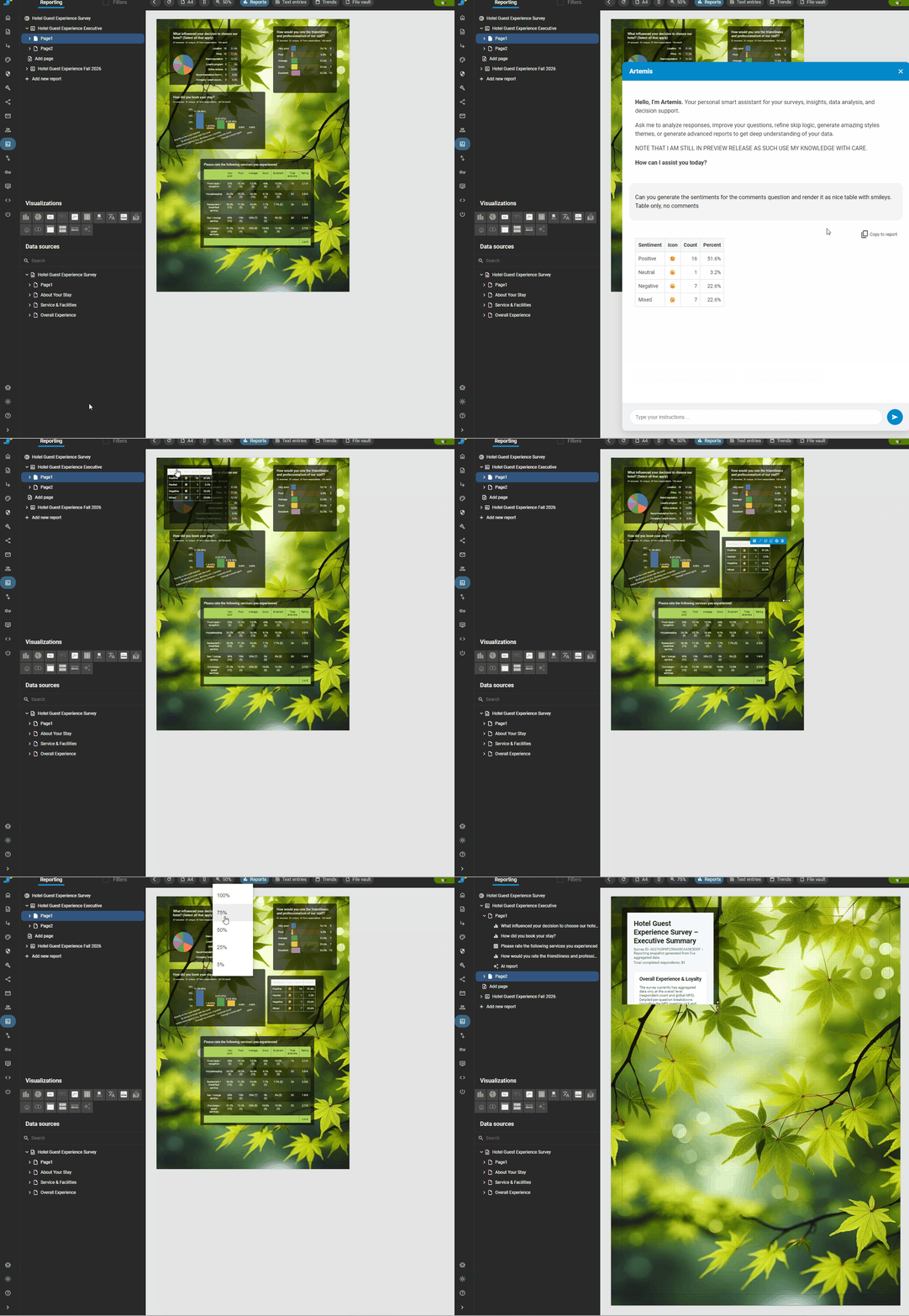
النتائج ليست مخرجات محادثة معزولة؛ بمجرد إنشائها يمكن إعادة استخدامها وتنظيمها وتضمينها مباشرة في التقارير الرسمية الموجودة وتحديثها تلقائيًا عند تسجيل إجابات جديدة.
لدمج نتيجة حصلت عليها من وكيلك في Artemis في أي من [تقاريرك](/ar/form-management/reports/report-builder.md) عليك أولاً الانتقال إلى التقرير الذي ترغب في إضافة ناتج المطالبة إليه.
بمجرد الدخول إلى التقرير ستتوفر خيار جديد "نسخ إلى التقرير" لكل مطالبة قمت بإدخالها حتى الآن. اختر المطالبة التي ترغب في نسخها إلى التقرير، ثم يمكنك تعديل النتائج أو مخرجات المطالبات مباشرة في منشئ التقارير.
{% hint style="info" %}
المخرجات المنسوخة ديناميكية وستعكس تلقائيًا بيانات المستجيبين الحالية التي يتم جمعها.
{% endhint %}
## 📝 إنشاء التقارير
بجانب دمج النتائج في التقارير الموجودة، تتيح لك Artemis أيضًا إنشاء التقارير نيابةً عنك بناءً على احتياجات تحليل البيانات لديك.
### 📄 إنشاء تقرير
* “إنشاء تقرير جديد من هذا التحليل.”
* “توليد لوحة معلومات تنفيذية.”
* “بناء تقرير ملخص يحتوي على رسوم بيانية ورؤى رئيسية.”
* “تحويل هذا التحليل إلى تقرير جاهز للعرض التقديمي.”
***
### 🔁 تعزيز التقرير
* “إضافة هذا الرسم البياني إلى التقرير الحالي لسؤال الرضا.”
* “إدراج الملخص التنفيذي في لوحة المعلومات الحالية.”
* “توسيع هذا التقرير برؤى نصية مفتوحة لسؤال التعليق.”
---
# Agent Instructions
This documentation is published with GitBook. GitBook is the documentation platform designed so that both humans and AI agents can read, navigate, and reason over technical content effectively. Learn more at gitbook.com.
## Querying This Documentation
If you need additional information that is not directly available in this page, you can query the documentation by asking a question.
Perform an HTTP GET request on the following URL with the `ask` and `goal` query parameters:
```
GET https://docs.ngsurvey.com/ar/hzmh-althkaa-alastnaay/wkyl-artemis-ai/thlyl-albyanat-wiadad-altqaryr/tkaml-iadad-altqaryr.md?ask=&goal=
```
`ask` is the immediate question: it should be specific, self-contained, and written in natural language.
`goal` is what the user is ultimately trying to achieve, the reason they need the answer. Sharing it helps GitBook give you a better, more relevant answer. A goal is most helpful when it describes the outcome the user wants rather than restating the question. For example, with `ask=how do I create an API token`, a goal like `automate deployments from our CI pipeline` lets GitBook tailor the answer to that use case.
The response will contain a direct answer to the question and relevant excerpts and sources from the documentation.
Use this mechanism when the answer is not explicitly present in the current page, you need clarification or additional context, or you want to retrieve related documentation sections.