> For the complete documentation index, see [llms.txt](https://docs.ngsurvey.com/llms.txt). Markdown versions of documentation pages are available by appending `.md` to page URLs; this page is available as [Markdown](https://docs.ngsurvey.com/ar/installation-setup/installation/mraslh-whatsapp/twilio-whatsapp-1.md).
# Unifonic
الاتصال بـ WhatsApp باستخدام Unifonic
باستخدام [Unifonic](https://www.unifonic.com) يمكنك تمكين ngSurvey للتفاعل مع مستجيبي WhatsApp بهذه الطريقة إذا كنت ترغب في استخدام [استبيانات المحادثة على WhatsApp](/ar/conversational-surveys.md) لمزايا ذلك من الضروري وجود حساب Twilio مسجل بالإضافة إلى حساب Facebook Business Manager.
## الإعداد الرئيسي
للتسجيل في حساب Unifnoic وإعداده مع WhatsApp يرجى التواصل مع مدير نجاح عملاء Unifonic الخاص بك.
## عنوان URL للنداء العكسي (Callback URL)
بمجرد إعداد حساب Unifonic مع WhatsApp تحتاج إلى ربط ngSurvey وUnfonic باستخدام عنوان URL للاستدعاء (callback URL).
1\) قم بتعيين Public Id وsecret في حساب Unfonic / [إعدادات النظام](/ar/installation-setup/system-settings.md) صفحة. بمجرد تعيين public id وsecrect ستتمكن من رؤية عنوان URL لاستدعاء WhatsApp (WhatsApp callback URL).
2\) انسخ هذا العنوان
3\) افتح واجهة Unifonic الخاصة بـ WhatsApp
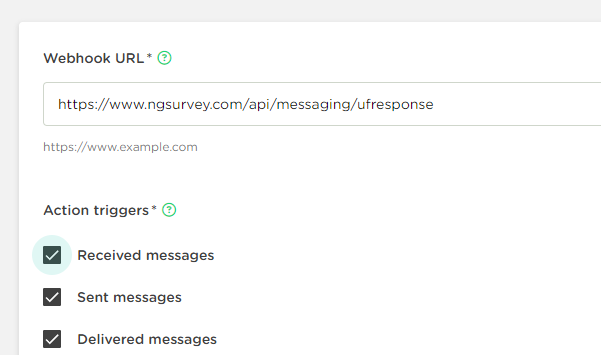
4\) أضف Webhook جديد والصق عنوان URL للاستدعاء الذي قمت بنسخه في الخطوة 2.
5\) بعد إضافة webhook تأكد من إنشاء قالب رسالة في حساب Unifonic الخاص بك وإضافته كـ [message template](/ar/conversational-surveys/rsalh-qalb-unifonic.md) في ngSurvey لاستخدامه في دعواتك-
---
# Agent Instructions
This documentation is published with GitBook. GitBook is the documentation platform designed so that both humans and AI agents can read, navigate, and reason over technical content effectively. Learn more at gitbook.com.
## Querying This Documentation
If you need additional information that is not directly available in this page, you can query the documentation by asking a question.
Perform an HTTP GET request on the following URL with the `ask` and `goal` query parameters:
```
GET https://docs.ngsurvey.com/ar/installation-setup/installation/mraslh-whatsapp/twilio-whatsapp-1.md?ask=&goal=
```
`ask` is the immediate question: it should be specific, self-contained, and written in natural language.
`goal` is what the user is ultimately trying to achieve, the reason they need the answer. Sharing it helps GitBook give you a better, more relevant answer. A goal is most helpful when it describes the outcome the user wants rather than restating the question. For example, with `ask=how do I create an API token`, a goal like `automate deployments from our CI pipeline` lets GitBook tailor the answer to that use case.
The response will contain a direct answer to the question and relevant excerpts and sources from the documentation.
Use this mechanism when the answer is not explicitly present in the current page, you need clarification or additional context, or you want to retrieve related documentation sections.