> For the complete documentation index, see [llms.txt](https://docs.ngsurvey.com/llms.txt). Markdown versions of documentation pages are available by appending `.md` to page URLs; this page is available as [Markdown](https://docs.ngsurvey.com/de/ki-suite/artemis-ai-agent/datenanalyse-und-berichterstellung/berichts-integration.md).
# Berichts-Integration
Durch Artemis erzeugte Insights sind vollständig in ngSurveys Berichtswesen integriert.
Ergebnisse sind keine isolierten konversationellen Ausgaben; einmal erstellt, können sie wiederverwendet, strukturiert und direkt in vorhandene formelle Berichte eingebettet sowie automatisch aktualisiert werden, wenn neue Antworten erfasst werden.
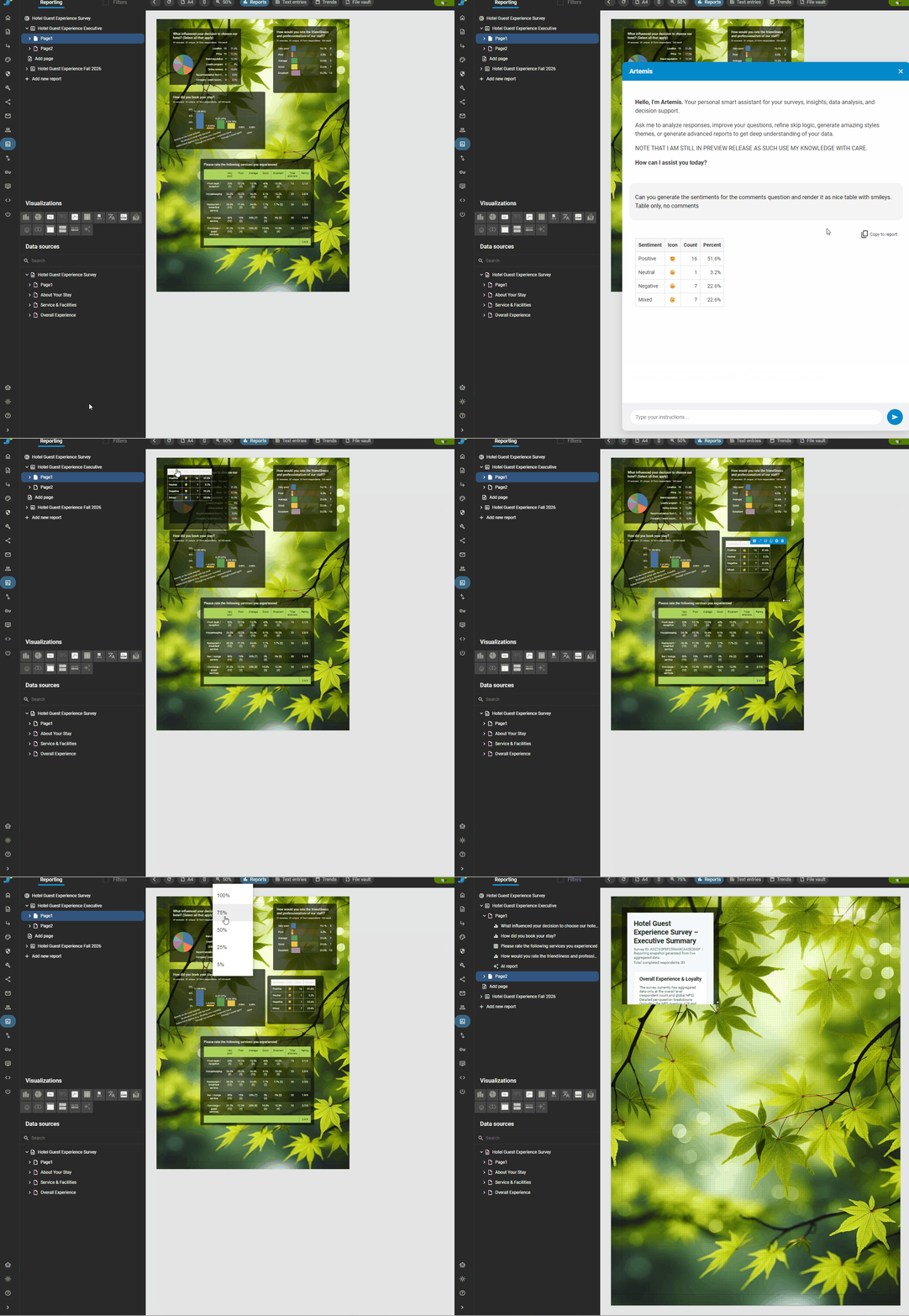
Um ein Ergebnis, das Sie von Ihrem Artemis-Agenten erhalten haben, in einem Ihrer vorhandenen [Berichte](/de/form-management/reports/report-builder.md) zu integrieren, müssen Sie zuerst zu dem Bericht navigieren, dem Sie die Ausgabe Ihres Prompts hinzufügen möchten.
Sobald Sie sich im Bericht befinden, steht für jeden bereits eingegebenen Prompt die neue Option „Copy to report“ zur Verfügung. Wählen Sie den Prompt, den Sie in den Bericht kopieren möchten; Sie können die Ergebnisse bzw. die Ausgabe der Prompts anschließend direkt im Report Builder weiter bearbeiten.
{% hint style="info" %}
Kopierte Ausgaben sind dynamisch und geben automatisch die aktuellen in der Datenerhebung erfassten Befragten-Daten wieder.
{% endhint %}
## 📝 Erstellung von Berichten
Neben der Integration von Ergebnissen in vorhandene Berichte ermöglicht Artemis Ihnen außerdem, Berichte basierend auf Ihren Analysebedürfnissen zu erstellen.
### 📄 Berichtserstellung
* „Erstellen Sie einen neuen Bericht aus dieser Analyse.“
* „Erzeugen Sie ein Executive-Dashboard.“
* „Erstellen Sie einen zusammenfassenden Bericht mit Diagrammen und zentralen Erkenntnissen.“
* „Konvertieren Sie diese Analyse in einen präsentationsfertigen Bericht.“
***
### 🔁 Berichtserweiterung
* „Fügen Sie dieses Diagramm dem aktuellen Bericht zur Zufriedenheitsfrage hinzu.“
* „Fügen Sie die Executive Summary in mein bestehendes Dashboard ein.“
* „Erweitern Sie diesen Bericht um Erkenntnisse aus Freitexten zur Kommentarfage."
---
# Agent Instructions
This documentation is published with GitBook. GitBook is the documentation platform designed so that both humans and AI agents can read, navigate, and reason over technical content effectively. Learn more at gitbook.com.
## Querying This Documentation
If you need additional information that is not directly available in this page, you can query the documentation by asking a question.
Perform an HTTP GET request on the following URL with the `ask` and `goal` query parameters:
```
GET https://docs.ngsurvey.com/de/ki-suite/artemis-ai-agent/datenanalyse-und-berichterstellung/berichts-integration.md?ask=&goal=
```
`ask` is the immediate question: it should be specific, self-contained, and written in natural language.
`goal` is what the user is ultimately trying to achieve, the reason they need the answer. Sharing it helps GitBook give you a better, more relevant answer. A goal is most helpful when it describes the outcome the user wants rather than restating the question. For example, with `ask=how do I create an API token`, a goal like `automate deployments from our CI pipeline` lets GitBook tailor the answer to that use case.
The response will contain a direct answer to the question and relevant excerpts and sources from the documentation.
Use this mechanism when the answer is not explicitly present in the current page, you need clarification or additional context, or you want to retrieve related documentation sections.